Posts

Showing posts with the label Security

ZipTie: New features, new name, new license?

Image
Introduction It has been over a year since I last posted about an exciting open source project called ZipTie . We use ZipTie to automatically discover our network devices, backup their configurations, and perform a variety of functions related to these devices. Many things have changed with ZipTie since my last post and I want to share those with you. I'll start with the positive changes first, because I am a positive type of person. New Features The most obvious improvement is the slick web interface that replaces the previous Java fat client. This interface is powered by Adobe Flex , so it has a great look and feel to it. Having a web interface also simplifies deploying ZipTie, because you don't have to worry about installing a Java application and all the required dependencies. Check out the screenshots : ZipTie has also added a great community resource called ZipForge , which is a place where anyone can publish custom tools that perform specific functions on network...
Reminder: Physical access = Root access

Today I needed to reset a password on an Ubuntu system. While doing this, I was reminded of just how simple it is to get root access on a default install of Ubuntu. I wanted to share these steps on this blog to remind people that if someone has physical access to your Ubuntu system, they can get root access in just a few seconds. Boot up your computer When asked, hit "Escape" to enter the GRUB menu Select the option that displays "recovery mode" Select the option labeled "root prompt" You are now logged in as root with the ability to change anything It is really just that simple. This root console is great for advanced users who need to reset a password, but the average user will have no idea what to do. For instance, here is how I found the main user of this system: root@laptop:~# cat /etc/passwd | grep 1000:1000 tristan:x:1000:1000:Tristan Rhodes,,,:/home/tristan:/bin/bash This output shows that there is a user named "tristan" who is the ma...

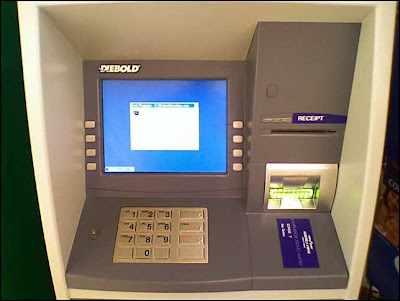
When an ATM machine uses Windows...

Image
You just may see this on your screen... This program was minimized on the bottom left side of the screen. Anyone other pictures of fun Windows errors in public places ?

Ubuntu needs a secure remote desktop

Image
Introduction If Ubuntu wants to be taken seriously in the workplace, it needs a secure remote desktop. Many people have a need to connect to their work computer from home using remote desktop technology. Currently, the Ubuntu Remote Desktop is a front-end for VNC, which allows you to remotely manage your desktop. It works well, and a nice feature was recently added that alerts you when someone is remotely controlling your desktop. The Problem The problem is that VNC provides very little security. It does encrypt the password that you use to connect with, but all other traffic is not encrypted. This means that if someone is intercepting your traffic, it will be possible for them to watch what you are doing (including typing passwords). Another problem is that VNC has a maximum password length of 8 characters, and it does not require a username. This means that an attacker only has to guess 1 to 8 characters correctly in order to connect to your machine. If you use the Ubuntu Re...

Internet Identity: Truth or Dare?

Should I use my real identity when communicating on the internet, or should I have a separate online identity? That is the question I have been thinking about as I watch my internet footprint grow with every blog entry, blog comment, forum post, mailing list reply, and IRC chat message. (FYI - IRC chat messages are often logged and posted online.) I do not have a reason to keep my privacy now, but who knows what the future holds? I may have new enemies in the future that I don't want to know personal details about me. Once data is on the internet, it stays on the internet. It is usually impossible to erase your writing from the public domain. I can only think of two options: 1. I can continue to use my real identity, but I must always keep in mind that what I write may be used against me in the future. This can be in the form of a job opportunity, an evil stalker, a political campaign, a business deal, or a lawsuit. 2. Create a new nickname that serves as my online identity. ...

How to setup a firewall in Ubuntu

Image
Introduction A firewall is a necessary piece of software on most operating systems. This is not true for Ubuntu, because the default install doesn't include any services that accept connections from the network. You can confirm this by running this command: sudo netstat -plut Services that accept connections from the network will include an asterisk symbol or an IP address in the field labeled "Local Address". Services that only accept connections from the local system will include the word "localhost". If you later decide to install a new service such as SSH or Remote Desktop (VNC), you will probably want to control who can access these services by installing a software firewall. Searching in Add/Remove Applications for "firewall" does not return any results. Searching in Synaptic Package Manager for "firewall" will provide you with 116 results. Obviously, these are not the best ways to find the right application. Firestarter Firewall (b...

WPA wireless "just works" in Ubuntu 7.04

Image
Introduction This past week I installed a pre-release of the next version of Ubuntu. This alpha version is called "Herd 4" and should NOT be installed on a production machine. Please wait until the final release of Ubuntu 7.04 which should be in April, 2007. With that disclaimer behind us, let me tell you that this next release is going to rock! In addition to many other improvements such as automatically installing multimedia codecs, Ubuntu 7.04 will now allow you to painlessly connect to secure wireless networks. I have been waiting a long-time for Linux to automatically connect to WPA -secured wireless networks. WPA is the minimum security for a modern wireless network to be considered "secure". (Even WPA can still be hacked if you use a small pre-shared key.) In past versions of Ubuntu, you had to manually install software ( xsupplicant ) and configure it if you wanted to connect to a WPA network. Now you can connect in two simple steps. First, click on t...

Store passwords securely in Firefox

Image
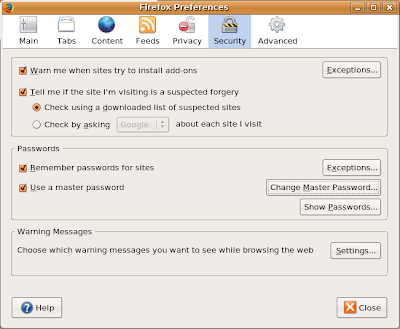
Introduction Most of us visit a lot of websites, and we have a need to login to many of these sites. We know that it would be a bad idea to use the same password for all online accounts, so we create unique passwords for each site. However, it is impossible for us to remember all of these passwords so we tell Firefox to remember them for us. This provides great convenience, but it also creates a huge security risk. Anyone who sits down at your computer can view your passwords! If you don't believe me, try this in Firefox: "Edit" > "Preferences" > "Security" > "Show Passwords". Fortunately, the smart people at Mozilla have created an improved way to store your passwords. This method requires creating a "Master Password" which is used to encrypt your online passwords. You can do this in Firefox by clicking on "Edit" > "Preferences" > "Security" and clicking on the button labeled ...